
WEESION / W10 SERIES
W10UM
EC fan · No 24 V DC output
Compact EC Fan & Chilled Beam Remote I/O Controller (BACnet/Modbus)
Every connection has a purpose.
Model-specific specifications, grouped by function. Refer to the manual for detailed diagrams, wiring conditions and configuration.
Power supply
- Power supply 230Vac or USB-C (only for testing and settings reasons),
Control & outputs
- EC fan control, with analog output 0-10Vdc
- 2x digital outputs for ON/OFF (230Vac, 24Vac, 24Vdc) valve control,
Sensors & inputs
- temperature sensor input PT1000,
- digital input, for window contact, occupancy sensor or energy saving contact or universal use
- analog input 0-10V (CO2 or other sensors),
Communication
- BACnet MS/TP or Modbus RTU communication.
USB-C is used for configuration and testing; follow the model’s manual for the operating installation.
Full product technical description
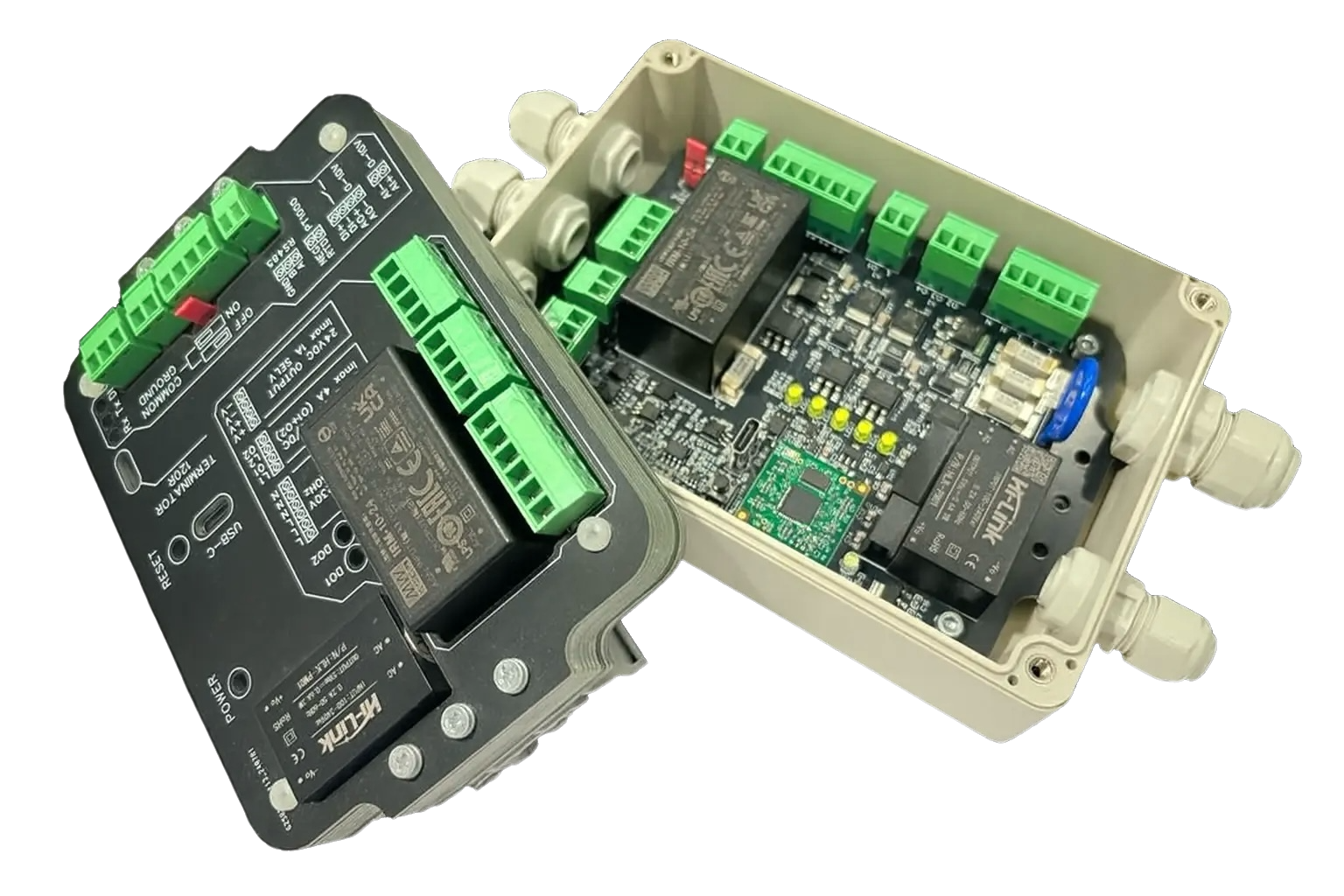
W10 series are small communication enabled (BACnet MS/TP or Modbus RTU) multifunctional fan coil or chilled beam remote I/O controllers, developed for intelligent room control applications and BMS integration. No other unnecessary control boxes or cables are required in the installation. All modules are equipped with USB-C connection for communication settings.
- Power supply 230Vac or USB-C (only for testing and settings reasons),
- EC fan control, with analog output 0-10Vdc
- 2x digital outputs for ON/OFF (230Vac, 24Vac, 24Vdc) valve control,
- temperature sensor input PT1000,
- digital input, for window contact, occupancy sensor or energy saving contact or universal use
- analog input 0-10V (CO2 or other sensors),
- BACnet MS/TP or Modbus RTU communication.
For more information refer to the Instruction manual.
The right module for the task.
W10UM is part of the W10 series for fan coils and chilled beams. Your fan type, valve actuators and required sensors determine the module selection.
Continuous EC fan control
A 0–10 V analogue signal lets the supervisory system set the speed of an EC fan. Select the module according to the motor type and the outputs your application requires.
Part of your BMS
BACnet MS/TP or Modbus RTU carry information between the module and the supervisory system. You define the control logic in the BMS or DDC to suit your project.
A compact I/O selection
A compact variant with the same core functions, without the 24 V DC power output. Refer to the model-specific manual for detailed wiring.
A clear path to installation.
Select the I/O
Match the requirements of the fan, actuators and sensors to the selected module’s inputs and outputs.
Prepare the module
Wire the module and peripherals on the workbench. Use USB-C to configure communication parameters.
Connect to the BMS
Verify communication and individual I/O points using a configured BACnet or Modbus DDC controller.
Weesion EKO concept room control IO modules — W10 series
W10T
- 3-speed fan
- Heating and cooling actuator
- VAV
- Temperature
- Active sensor
- 24 V DC power output
- Digital input
- BACnet
- Modbus
W10TM
- 3-speed fan
- Heating and cooling actuator
- VAV
- Temperature
- Active sensor
- No 24 V DC power output
- Digital input
- BACnet
- Modbus
W10U
- EC fan
- Heating and cooling actuator: ON/OFF or 0–10 V
- VAV
- Temperature
- Active sensor
- 24 V DC power output
- Digital input
- BACnet
- Modbus
W10X
- 3-speed fan
- Heating or cooling actuator
- VAV
- Temperature
- Active sensor
- 24 V DC power output
- Digital input
- BACnet
- Modbus
W10-CUSTOM
We adapt the product to your requirements — from the number of inputs and outputs to specific functions. You define the needs. Weesion creates the solution.